
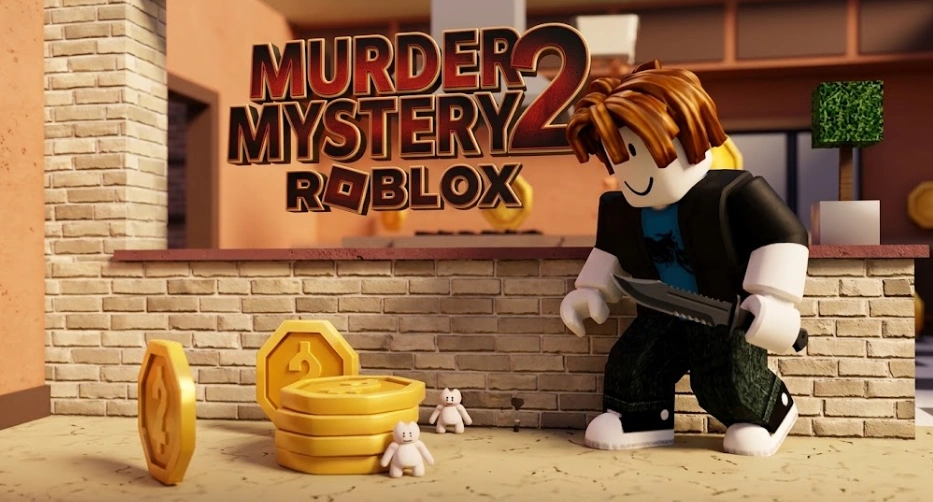
Have you seen the latest viral videos in Roblox Murder Mystery 2? Famous YouTubers like Angelazz are running around as these insanely small, tiny characters. They look like little walking Lego bricks, and guess what? The Murderer and the Sheriff literally cannot see them!
Many players are asking: "Is this a secret admin skin? Can only famous YouTubers use it? How do I get it?"
Good news, bro: Anyone can get this tiny avatar! You don't need to be a YouTuber, and you don't need any illegal hacks. In this guide, I will show you exactly how to get the smallest avatar in Roblox and how to use it to dominate MM2 without spending all your Robux!
Is This Tiny Avatar Allowed in MM2?
Yes! It is 100% legal. This is not an exploit or a cheat code. It uses official Roblox catalog items.
However, in games like Murder Mystery 2, being small feels like a total cheat code. Why? Because of hitboxes and visibility.
- When you are the size of a trash can or a bush, you can hide behind small walls, under tables, or behind the kitchen counter.
- In the heat of the game, the Murderer is sprinting fast, looking for normal-sized players. They will run right past you because you are completely out of their line of sight!
- Even when they do see you, throwing a knife at a tiny target is much harder.
How to Make the Smallest Avatar (Step-by-Step)
To become a mini-person, you cannot just use the standard Roblox starter characters. You need to combine a few cheap or free items from the Roblox Marketplace. Here is the secret recipe:
Step 1: Buy a UGC Mini Bundle
Go to the Roblox Marketplace and search for "Mini", "Meme Dog", or "Chibi" in the Characters section. Creators make these custom packages (called UGC Bundles). Popular ones include the Mini Plushie, Mini Man, or Stickman. They usually cost between 0 to 25 Robux--super cheap!
Step 2: Equip the Right Animation
To make your character look even smaller and flatter, change your animation package. The Toy Animation or Ninja Animation works best. They make your character crouch or stand in a way that lowers your height even more.
Step 3: Change Your Scale Settings
This is the most important part! Go to your Avatar Editor, click on Head & Body, and go to Scale.
- Move the Height slider all the way down to 0%.
- Move the Width slider all the way down to 0%.
- Set your body type to R15.
Boom! Your avatar will shrink instantly. Your legs might look longer than your body, but you are now officially a mini-creature.
Pro Tips for Playing MM2 as a Mini Character
Now that you have your tiny body, it is time to troll some lobbies. Here is how to play like a pro:
The "Dead Body" Bait
In MM2, when someone dies, their grey character model stays on the floor for a bit. Because you are so small, you can actually stand right inside a dead body! The Murderer will think it's just a eliminated player and walk away, allowing you to survive easily.
Hide in Plain Sight
Don't run around in the open hall. Use the maps to your advantage. Map objects like the plants, chairs, and boxes are your best friends. You can sit on an electrical box or hide inside a bush. You don't even need to move to win the round.
Watch Out for the Clues!
There is one downside to being a F2P star. If you are a verified YouTuber or you wear glowing accessories, players might spot you. Also, if you get the Sheriff's gun, the gun icon above your head will stay normal size. It looks hilarious, like a giant gun floating over a tiny Lego piece! So, if you pick up the gun, make sure to shoot quickly before the Murderer spots the floating weapon.
Summary: Go Try It Now!
You don't need a special admin account to have fun with tiny avatars. Anyone can go to the store, grab a mini bundle, set their sliders to zero, and start playing.
It is the funniest way to play Roblox Murder Mystery 2 right now. Go make your own mini avatar today, join a server, and watch the Murderers get totally confused. Have fun grinding, and see you in the lobbies!
Ride A Pet Radar Guide: Prices and Egg Rarities
Check the Ride A Pet Radar tiers, prices, egg rarities, and how to choose the right Radar for your current progression.
Ride A Pet Beginner Guide: What to Do First
New to Ride A Pet? Learn what to do first, how to choose pets, find eggs, use Radar, earn cash, explore the map, and work toward Rebirth.
How to Find Eggs Faster in Ride A Pet
Learn how to find eggs faster in Ride A Pet using the right pet, Radar, Track, and search routes. Improve your egg runs and find better pets.